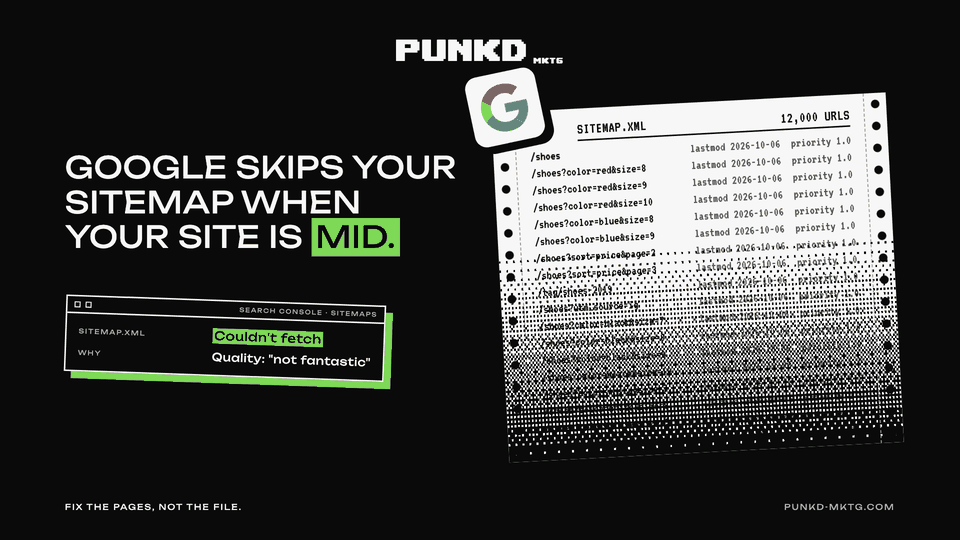
Google skips your sitemap when it thinks your site is mid
TL;DRAt a glance
- A "Couldn't fetch" sitemap in Search Console is often a quality signal, not an XML bug.
- Google's John Mueller: crawl demand is "very often based on the perceived quality of a website".
- The priority and change frequency fields are dead. Google uses the URL and the change date.
- Fake "updated today" dates on every URL teach Google to ignore your dates.
- AI crawlers have no console to submit to: name the file sitemap.xml and keep an RSS feed.
- LLMs.txt does not replace a sitemap.
Your sitemap is a request, not an order. If Google thinks your site is not worth much, it can skip the file completely, and Search Console will just say "Couldn't fetch".
That came straight from Google on 1 October, in episode 114 of its Search Off the Record podcast. Below: what Google said, what it means, and the cleanup that gets your sitemap read again.
WHY GOOGLE SKIPS A VALID SITEMAP
A sitemap is a file that lists the pages on your site so search engines can find them. "Couldn't fetch" is the error site owners panic about.
Mueller gave two reasons, and neither is about broken XML.
- Host load. Google is busy. In his words, "we don't have any time to crawl this sitemap file because we're too busy with other things."
- Crawl demand. Google decides it does not need more from your site. And that demand "is very often based on the perceived quality of a website."
Then the line every SEO should print out: "Sometimes it's that our systems assume that the overall quality of this website is not fantastic. Therefore, we're not going to spend a lot of time crawling and indexing the content." If quality "improves significantly", Google will go back and use the file.
So you cannot fix this by resubmitting. You fix it by making the site worth crawling.
THE FIELDS GOOGLE STOPPED READING
Sitemaps used to carry a priority field and a change frequency field. Mueller explained what happened: SEOs marked every URL as maximum priority and every page as always fresh. Both fields became useless, and Google dropped them.
What Google does use: the URL and the change date (the lastmod field). The date should show when you last made a major change. If you stamp today's date on every URL, Google "will realize that it doesn't make much sense to focus on that."
Limits worth knowing: 50,000 URLs and 50 MB per file, measured uncompressed. Bigger sites split into several files under a sitemap index.
SITEMAPS ALSO PICK YOUR CANONICAL
When several URLs show almost the same page (filters, tracking parameters, print versions), Google picks one as the canonical, the version it shows in results. Mueller said listing one of them in your sitemap makes it "a little bit more likely" Google picks that one.
Worked example with made-up numbers: an online store has 12,000 URLs. 4,000 are real product and category pages. 8,000 are filter combinations like /shoes?color=red&size=9. If the sitemap lists all 12,000, you are asking Google to spend its time on 8,000 thin pages and you are telling it your site is mostly filler. List the 4,000 that matter.
THE AI CRAWLER ANGLE
ChatGPT, Perplexity and other AI tools do not give you a console to submit a sitemap. Mueller's advice: "either you stick to the generic naming, call it sitemap.xml, or you focus on RSS feeds". He said he has seen AI crawlers find those files in his own server logs.
An RSS feed works like a mini sitemap: it lists your 10 or 20 most recent URLs with dates. Google can use it too.
And LLMs.txt, the markdown file some sites add for AI tools? Asked if it replaces an XML sitemap, Mueller said: "No."
THE PUNKD TAKE
The sitemap was never the problem. Too many sites we audit treat it like a magic spell: submit, resubmit, ping, pray. Google just told you the truth. If your site is padded with thin pages, auto-generated junk and fake freshness, it stops listening.
Spend the time on the pages, not the file.
STEAL THIS
- Open Search Console, go to Sitemaps and check every file. A valid file showing "Couldn't fetch" for weeks is a quality warning.
- Pull every URL in your sitemap and mark each one: worth ranking or filler. Remove the filler from the sitemap, then improve it, merge it or noindex it.
- Fix your lastmod dates so they change only when the page really changes.
- Delete the priority and change frequency fields. They do nothing.
- Keep the file at yoursite.com/sitemap.xml, link it in robots.txt and keep a working RSS feed for AI crawlers.
THE SHORT VERSION
- "Couldn't fetch" can mean Google thinks your site is not worth the crawl.
- Google reads the URL and the change date. Nothing else.
- List only the pages you want ranked.
- Name it sitemap.xml and keep RSS alive for AI crawlers.
Is your sitemap a list of your best pages, or a list of everything your CMS ever made?
We find the pages dragging your whole site down, then fix what earns.
Book Free Consultation